
A tiny loop is changing how we interact with computers.
Its name: the Agent Loop.
The agent loop is built out of the following components:
- A Large Language Model that can be fed a context and pick what it thinks is the best appropriate tool for a task;
- A set of such tools to observe the world and act on it;
- A while loop to repeat the reflection and action process (aka ReAct) until some predefined goal is met.
Surprisingly, this does work.
LLM-based AI agents have proven able to craft and maintain production-ready software. The same agents are now exploited for office tasks via experimental projects such as Claude Cowork, nanoclaw or Nemoclaw.
The tricky part of automating or enhancing companies' administrative processes with AI agents is not really AI anymore. It's the integration with the software ecosystem that surrounds the AI agent.
As a long standing Ubuntu user and agentic engineer, I think that the rise of AI agents forces us to rethink what a good Linux distribution is, in terms of built-in software suite and core features.
Ubuntu's roadmap for AI was shared with me just after publishing the first draft of this article. Great timing! My hot take: this roadmap is timid, while at the same time being too centered on AI itself rather than the software environment AI evolves in, which is what I would expect from the OS.
In this article, I try to list a few requirements for building an agentic Linux distribution.
1. Treat AI agents (and human enthusiasts) as first-class citizens
An agentic Linux distribution should consider four types of users:
- Non-technical users who want an alternative to proprietary OS. Computers should liberate people.
- Tinkerers. Non-coder enthusiasts who love optimizing their daily workflows. This includes exhausted developers who want to interact with graphical user interfaces, at least from time to time. The ability to generate small code snippets with AI vastly augmented the number of people in this category (aka "vibe coders"), and overall, I think that's for the best.
- Technical experts. Developers, engineers of all sorts with advanced use cases: using the OS in cloud services, producing software, running complex tasks in their domain...
- AI agents and automation platforms. Pieces of software that connect other pieces of software together in an intelligent way.
Categories 1 and 3, non-technical users and technical experts, are well-served with Ubuntu or Fedora or whatever "user-friendly" Linux distribution they favor.
However, I think that there is room for a lot of improvements as for categories 2 and 4: "human tinkerers" and "non-human automated systems". They should be first-class citizens in an agentic Linux distribution. The next points strive to elaborate on this idea.
2. Propose a centralized, user-friendly API keys and environment variables management system
Self-hosting an advanced LLM is difficult and requires costly hardware, so the intelligence of an AI agent most often relies on API calls to cloud services.
Even when hosting locally with tools such as Ollama or vLLM, the AI model is most often served using an HTTP API and it can be worthwhile to secure its access using an API key.
To this day, I could not figure out the proper way to store an OpenRouter, Mistral or OpenAI API key in my Linux system, in order to make them available as environment variables. I admittedly just shove them in ~/.profile and forget about it.
Advanced scenarios that an API key management system should handle:
- Activating or deactivating the key globally
- Rotating keys, setting expiration dates at storage level
- Controlling access to the key
- Swapping or accessing keys depending on context, for instance handling a test-only API key vs a production API key
- Etc.
While it's important to educate ourselves and take responsibility over securing our system, this is definitely the kind of feature that I would expect to come built-in into my computer.
3. Consider Dockerized web apps the same as packaged software
A free open source self-hosted version coupled with a paid cloud hosted alternative is a very common business model for open source projects.
Example of such projects in the field of agentic AI:
- Langfuse for monitoring agents
- LiteLLM for deploying an LLM gateway using the Openai pseudo-standard format, acting as a single endpoint for all your models, local or cloud
- Ollama to run local LLMs
- Open WebUI to access an agentic GUI
- N8n Community Edition for automation
The web browser may not provide the best user experience, but it's standardized, cross-platform, and familiar to end users.
You don't even need Electron or Tauri to have a web UI on your desktop, there is a simpler way: run a dockerized web server, open your already-installed browser and call it a day.
Virtualization with Docker makes the install process reproducible, relatively secure and reliable, with a minimal overhead. But it's still quite technical.
Docker Desktop provides visual feedback on the running containers, but doesn't really act as a software hub or command center.
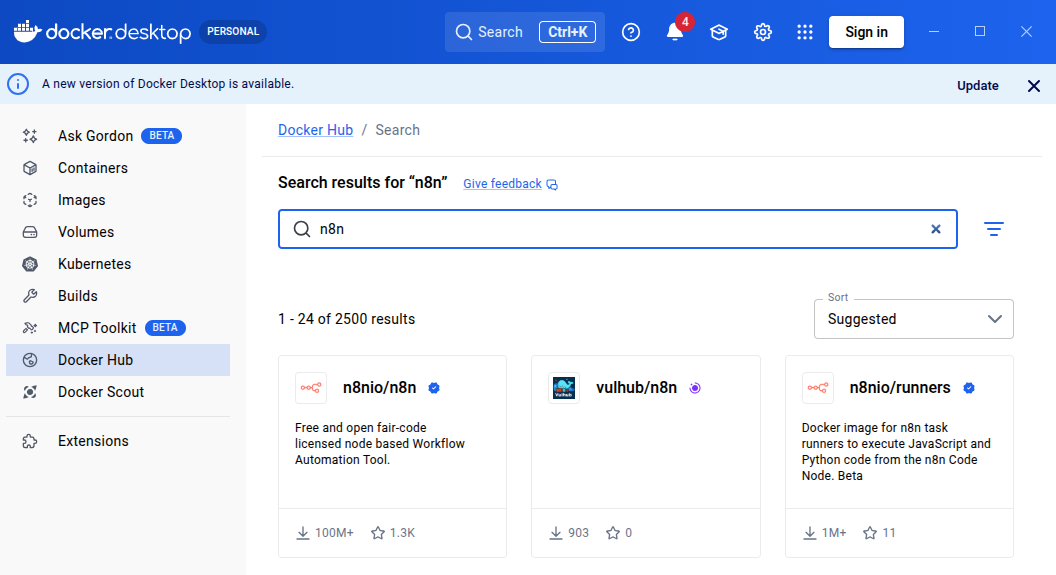
Docker Desktop is a first-step towards dockerized web apps being treated as normal software applications, and it also includes MCP-related features.
Features I would appreciate in a "Docker Software Command Center":
- Thinking in terms of "dockerized software" rather than image or docker-compose file, with a user experience similar to Flatpak or Snap installs
- Easy way to start/stop a dockerized service (not just an image)
- Direct access to the URL of the deployed service, to access the UI
- Easy way to manage and backup the databases
This might require associating images/compose files with an additional configuration, akin to what a .desktop file does for a command line tool.
4. Facilitate cloud connections and credentials management
Automation tools are often beloved not for the automation part, but for their ability to integrate with many cloud systems and manage credentials.
I hate connecting to third-party APIs in software projects. Handling the secrets is messy, you have to dig poorly written over-complicated tool-specific documentations, SDKs are always either broken or 1 Gb of automatically generated JS code, glue code is tricky to test, and it's completely dull as a hundred other developers are probably doing the same thing at the same time in front of their own computer.
Fedora Workstation and Ubuntu Desktop have a system to connect cloud accounts via Gnome Online Accounts. It targets integration with a few built-in Gnome software but to my best knowledge doesn't document how you could reuse the credentials in your apps or scripts.
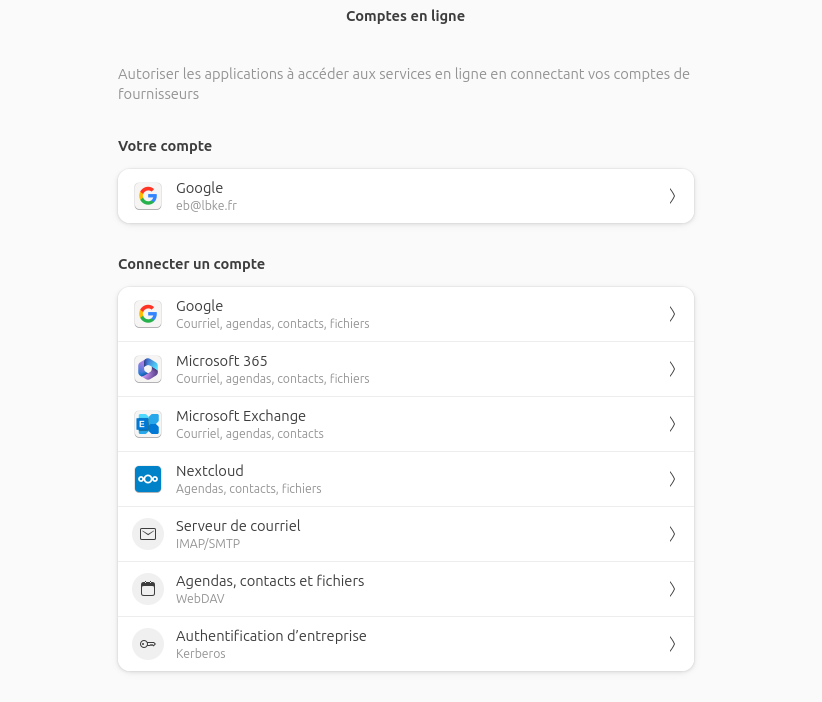 I had no idea this existed before writing this article. It seems that Google Drive support will be dropped anyway in Gnome 50. I am late to the party it seems.
Just give me cloud credentials management system at OS level, with a simplified documentation and a developer SDK in most common languages, and I'll be the happiest developer.
5. Pour tons of shortcuts and customizations into core apps - there are never enough
I've spent more than 2 hours trying to swap the default terminal that opens with Nautilus right-click.
I failed.
I did read the doc. I did read the XDG Desktop Entry Specification that standardize desktop shortcuts across Linux distributions. I did find the proper configuration files and updated it.
I am a CS engineer with over 8 years of professional experience, I can be dumb sometimes but I like to think that on average, I should be able to achieve such tasks without a bit less trouble and a bit more success.
At some point you can't blame the user. The Linux ecosystem is great and well-standardized, but it still lacks user-friendliness when it comes to customization.
And what makes AI agents successful is exactly their capability to automate highly personalized tasks.
6. Include a well-designed built-in automation system
Without generative and agentic AI, automation projects tend to be disappointing and fail.
Take email categorization as an example. You can treat maybe 50% of your emails with keyword-based handling. But for the other half, you need to actually read the text to determine the proper answer, and only LLMs can do that.
The n8n automation platform, which can be self-hosted in its community edition, has recently received a lot of improvements and it has correctly taken the agentic shift by introducing powerful agent and LLM nodes.
I love n8n. But I hate n8n too.
It's designed with a cloud-first approach, and the developer experience is still not very good: no easy way to create your own nodes, lack of reusability for common programming patterns, AI nodes still a bit simplistic.
To my best knowledge, there is a void when it comes to local-first no-code automation systems, that n8n won't fill (RIP n8n Desktop).
7. Favour tools over software (and a bash tool for running generated CLI commands is NOT enough)
An agent doesn't exactly care about the available software, as it reasons at the more granular level of "tools".
Example of tools you'd need to generate invitations to your birthday party:
- 🧑 A human would open Libre Office and tap text to insert the guest first name and last name to customize the invitation. 🤖 An agent would rather use an SDK or even edit the content of zipped XML .docx or .odt file.
- 🧑 A human would open Mozilla Thunderbird to read their emails, in order to see who answered your last burst of invitation. 🤖 An agent would rather consume the feed directly using IMAP, or use a command-line tool like Pimalaya.
- etc.
Due to the lack of programmatic APIs in most software - and I don't blame them, in a world without agents such APIs barely make sense in the first place - AI agents tend to rely on CLI commands, using a generic bash tool.
Are CLI commands the alternative? I don't think so.
The bash tool, used by LLM AI agents to run custom commands they generate on-the-fly, is the GOTO of agentic engineering. You can quote me on this. It's hard to audit, clumsy, insecure, and you'll be tempted to use the hell of it to make your agents super powerful.
Generating Python scripts is only marginally better. My eyes are bleeding when I see Claude Desktop with Claude Cowork trail of actions for crafting a simple Excel file gathering invoices in a Windows environment (it's mostly running terminal commands, or crafting Python script with shutils) - and yet it is currently one of the most advanced agentic office automation tool. I was genuinely surprised to see that it could edit a .docx file to alter content without destroying the layout. If you wonder how Claude Desktop works: it's just Electron-based UI, an agent loop based on Claude Code capabilities, and a bunch of tools for office tasks.
CLI tools are not bad per-se for agentic AI. See Pandoc, poppler-utils for PDF conversion or Pimalaya for emails. But they must be wrapped into a proper tool configuration for agentic usage. This tool configuration is actually quite akin to .desktop files or software module: a tool has a name, a description, maybe labels, relationship with other tools interruption rules and all sorts of such configurations.
So to sum it up, an agentic Linux distribution would need:
- More wrapper around CLI tools to constitute actual AI agent tools;
- More APIs.
Regarding agent-friendly APIs, the MCP protocol helps with standardization. But community-crafted MCP servers are the worst pieces of software you'll ever imagine. Most of them are vibe-coded and have no sense of what agentic engineering is. That's ok, is agentic engineers are parts of a young community, vivid and innovative. But god, so bad at software engineering sometimes ':).
In the short run, to better serve locally-running agents with toolized features, I'd recommend setting up a user-level MCP gateway, separated from agent implementation and centralizing connections to every other tools library or MCP server.
This architecture allows:
- Auditing the tools loaded by each MCP server. Vercel got it right when it introduced static tool generation to prevent prompt injection, which is bound to happen with dynamically loaded tools.
- Setting up permissions at the tool granularity.
- Securing agents' trajectories. A tool like langfuse allows audit but is not meant for securing tool calls before they happen.
8. Provide agent-friendly office tools
Closely related to previous points, generalist AI agents running on local computers are particularly needy for office tools.
Text file and structured documents reading and editing, calendar planning, task management, team communication, folders navigation, spreadsheets management, reading and drafting emails and whatever actions a human may take a hundred times per day of work are the top priority for agentic engineering.
The state of the art in this area is very limited, in particular when it comes to European or open source solutions:
- Proton Drive SDK is a WIP in 2026 and covers only file management (the "Drive" part)
- LibreOffice SDK is very hard to figure and won't provide team work anyway
- python-docx is nice (see this research paper about automating Microsoft Word with it), but encloses us again in the Microsoft ecosystem and we have to figure equivalent for each type of document
- The Euro-office initiative aims at creating a solid open source solution for collaborative document editing but it's like 2-days old
- Nextcloud seems to be one of the best candidates in the area of office tools that are both agent-friendly and human-friendly?
We should probably have poured more energy on this problem a few years ago. Millions of people are spending their days in front of a screen doing administrative tasks. I don't think they would shed a tear if all computer vanished overnight.
But I am still optimistic as to my best knowledge, the people behind these office suites have a clear understanding of the impact of AI on their field and work hard on making them better. Yeah, even you, Microsoft.
Where we go from there
I am building fais, a tiny CLI agent for office automation tasks. I pour a lot of love into each feature, and write them (mostly) by hand, even when it's hard. Since I am a professional trainer, I need to get a real feeling of it what means to craft an AI agent before I can teach LangChain and agentic engineering. It's insightful, funny, but this is definitely not an efficient process.
I suggest that we, the open source community, start working on a standardized Agentic Command Center, made of one or more desktop applications or web servers, that implements the features listed above. We should not be afraid to use coding agents to help with the task, and go as far as setting up an agentic software factory.
Let's not leave the "agentic OS" market to Windows or MacOS. We can do better than forcefully shoving an LLM-based chatbot in your still painfully slow desktop UI . We can make Linux the actual OS for humans and agents together.
